建立 webpack+vue-loader 项目
初始化
创建 jtodo 目录,并初始化项目
$ git init // 初始化 git 仓库
$ npm init // 初始化 npm 项目,目录生成 `package.json` 文件
安装 webpack 打包工具,vue 解释器
$ npm i webpack webpack-cli vue-template-compiler css-loader --save-dev
$ npm i vue vue-loader --save-dev
新建 src 目录,及该目录下的 app.vue 和 index.js 文件
// app.vue
<template>
  <div id="app">{{ text }}</div>
</template>

<script>
export default {
  data() {
    return {
      text: "hello world!",
    };
  },
};
</script>

<style>
#app {
  color: red;
}
</style>
// index.js
import Vue from 'vue'
import App from './app.vue'

const root = document.createElement('div')
document.body.appendChild(root)

// 将 app.vue 挂载到 root 元素上
new Vue({
  render: h => h(App)
}).$ mount(root)
配置项目的打包入口和出口
在根目录新建 webpack.config.js 文件,并配置项目的打包入口和出口
// webpack.config.js
const path = require('path')

module.exports = {
  entry: path.join(__dirname,  // 使用绝对路径'src/index.js'),
  ouput: {
    filename: 'bundle.js',
    path: path.join(__dirname, 'dist')
  }
}
配置 build 脚本并测试
在 package.json 配置 build 脚本
// package.json
{
  ...
  "scripts": {
    ...
    "build": "webpack --config webpack.config.js"
  }
}
此时尝试 $ npm run build ,报错如下
ERROR in ./src/app.vue 1:0
Module parse failed: Unexpected token (1:0)
You may need an appropriate loader to handle this file type.
> <template>
|   <div>hello</div>
| </template>
...
webpack 配置项目加载静态文件和 CSS 预处理器
配置 vue 文件中的 CSS 解释器
// webpack.config.js
const { VueLoaderPlugin } = require('vue-loader')

module.exports = {
  ...
  module: {
    rules: [
      {
        test: /.vue$ /,
        loader: 'vue-loader'
      },
      { // vue-loader@15.*之后,还需 css-loader 去解析 vue 中的 style
        test: /\.css$ /,
        use: [
          'css-loader'
        ]
      }
    ]
  },
  plugins: [
    new VueLoaderPlugin()
  ]
}
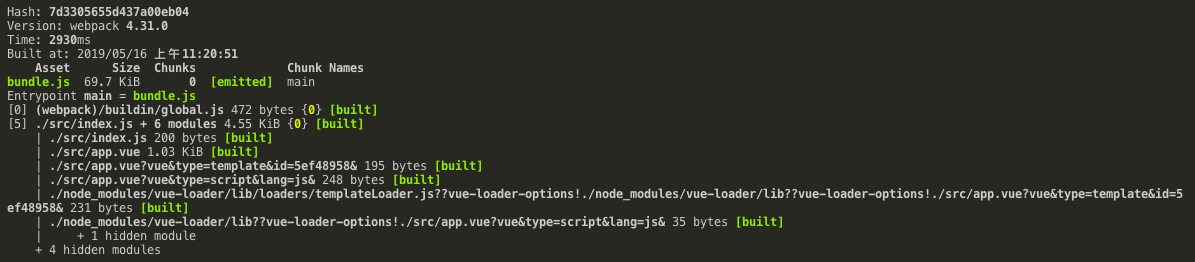
运行 $ npm run build ,成功打包项目
配置项目加载静态文件
项目中的一些小静态文件,可以把小静态文件转换成代码,直接写到 JS 文件中,减少 HTTP 请求。
安装解释器
$ npm i file-loader, url-loader --save-dev
配置项目加载静态文件
// webpack.config.js
module.exports = {
  ...
  module: {
    rules: [
      ...
      {
        test: /\.(gif|jpg|jpeg|png|svg)$ /,
        use: [
          {
            loader: 'url-loader', // 把小静态文件转换成代码,直接写到 JS 文件中,减少 HTTP 请求
            options: {
              limit: 2048, // 单位是 B
              name: '[name]-aaa.[ext]' // 重命名图片
            }
          }
        ]
      }
    ]
  }
}
接着在目录 src/assets/images/ 下新建 bg.svg 文件测试
<svg xmlns='http://www.w3.org/2000/svg' width='400' height='400' viewBox='0 0 800 800'><rect fill='#330033' width='800' height='800'/><g fill='none' stroke='#404' stroke-width='1'><path d='M769 229L1037 260.9M927 880L731 737 520 660 309 538 40 599 295 764 126.5 879.5 40 599-197 493 102 382-31 229 126.5 79.5-69-63'/><path d='M-31 229L237 261 390 382 603 493 308.5 537.5 101.5 381.5M370 905L295 764'/><path d='M520 660L578 842 731 737 840 599 603 493 520 660 295 764 309 538 390 382 539 269 769 229 577.5 41.5 370 105 295 -36 126.5 79.5 237 261 102 382 40 599 -69 737 127 880'/><path d='M520-140L578.5 42.5 731-63M603 493L539 269 237 261 370 105M902 382L539 269M390 382L102 382'/><path d='M-222 42L126.5 79.5 370 105 539 269 577.5 41.5 927 80 769 229 902 382 603 493 731 737M295-36L577.5 41.5M578 842L295 764M40-201L127 80M102 382L-261 269'/></g><g fill='#505'><circle cx='769' cy='229' r='5'/><circle cx='539' cy='269' r='5'/><circle cx='603' cy='493' r='5'/><circle cx='731' cy='737' r='5'/><circle cx='520' cy='660' r='5'/><circle cx='309' cy='538' r='5'/><circle cx='295' cy='764' r='5'/><circle cx='40' cy='599' r='5'/><circle cx='102' cy='382' r='5'/><circle cx='127' cy='80' r='5'/><circle cx='370' cy='105' r='5'/><circle cx='578' cy='42' r='5'/><circle cx='237' cy='261' r='5'/><circle cx='390' cy='382' r='5'/></g></svg>
配置 SCSS 解释器
安装解释器
$ npm i sass-loader, node-sass, style-loader --save-dev
配置 SCSS 解释器
// webpack.config.js
module.exports = {
  ...
  module: {
    rules: [
      ...
      {
        test: /\.scss$ /,
        use: [
          'style-loader',// 将 JS 字符串生成为 style 节点
          "css-loader", // 将 CSS 转化成 CommonJS 模
          "sass-loader"
        ]
      }
    ]
  }
}
接着在目录 src/assets/styles/ 下新建 global.scss 文件测试
// global.scss
html,
body {
  margin: 0;
  padding: 0;
  width: 100%;
  height: 100%;
}

body {
  background-image: url("../images/bg.svg");
  background-size: cover;
  background-position: center center;
  font-size: 14px;
  color: #4d4d4d;
  font-weight: 300;
}
配置 JSX 解释器
与 Vue 文件同样用来创建 html 的文件是 JSX,JSX 文件需要 Babel 解释。
安装
$ npm i @babel/core babel-helper-vue-jsx-merge-props babel-loader babel-plugin-syntax-jsx babel-plugin-transform-vue-jsx --save-dev
配置 JSX 解释器
// webpack.config.js
module.exports = {
  ...
  module: {
    rules: [
      ...
      {
        test: /\.jsx$ /,
        loader: 'babel-loader'
      }
    ]
  }
}
在项目根目录下新建 .babelrc 文件
// .babelrc
{
  "plugins": ["transform-vue-jsx"]
}
配置 postcss 处理器
CSS 预处理器能够优化 CSS 代码,例如添加 webkit- 以便适应不同的浏览器。
安装
$ npm i babel-preset-env postcss-loader postcss-strip-inline-comments --save-dev
$ npm i autoprefixer
配置 .babelrc
// .babelrc
{
  "presets": [
    "env"
  ]
  ...
}
在更目录新建 postcss.config.js ,配置 CSS 预处理器配置
const autoprefixer = require("autoprefixer");

module.exports = {
  plugins: [
    autoprefixer(), // 优化 css 代码,例如添加 webkit-
  ],
};
配置 webpack.config.js
// webpack.config.js
...
const config = {
  ...
  module: {
    rules: [
      ...
      {
        test: /\.scss$ /
        use: [
          'style-loader',
          'css-loader',
        	{
            loader: 'postcss-loader',
            options: {
              sourceMap: true // 直接使用 scss-css 生成的 sourceMap
            }
          },
          'sass-loader'
        ]
      }
  	]
	}
}
配置开发环境
配置 webpack-dev-server
webpack-dev-server 能帮助程序员在开发环境中预览项目
安装
$ npm i webpack-dev-server cross-env --save-dev
在 package.json 配置 dev 脚本,并设置环境变量标识环境,同时使得跨平台命令统一(cross-env)
// package.json
{
  ...
  "scripts": {
    ...
    "build": "cross-env NODE_ENV=production webpack --config webpack.config.js",
    "dev": "cross-env NODE_ENV=development webpack-dev-server --config webpack.config.js"
  }
}
在根目录新建 webpack.config.js 文件,并配置项目的开发环境
// webpack.config.js
const path = require('path')
const { VueLoaderPlugin } = require('vue-loader')
const webpack = require('webpack') // 引入 webpack

// 启动 build 或 dev 脚本时,会把环境变量存在 process.env 中
const isDev = process.env.NODE_ENV === 'development'

const config = {
  target: 'web', // 编译目标 web 平台
  entry: path.join(__dirname, 'src/index.js'),  // 使用绝对路径
  output: {
    filename: 'bundle.js',
    path: path.join(__dirname, 'dist')
  },
  module: {
    rules: [
      ...
    ]
  },
  plugins: [
    new webpack.DefinePlugin({
      'process.env': {
        NODE_ENV: isDev ? '"development"' : '"production"',
      },
    }),
    new VueLoaderPlugin(),
  ]
}

if (isDev) {
  config.devServer = {
    port: 8000,
    host: '0.0.0.0', // 设 IP 为 0.0.0.0 可用同时用 localhost 和内网 IP 访问
    overlay: { // 在网页上报错
      errors: true,
    }
  }
}

module.exports = config
配置 html 入口
安装
$ npm i html-webpack-plugin --save-dev
预览项目需要有一个 html 文件去包含 index.js ,在 webpack.config.js 添加如下信息
// webpack.config.js
...
const HTMLPlugin = require('html-webpack-plugin')

const config = {
  ...
  plugins: [
    ...
    new HTMLPlugin()
  ]
}
配置热重载和 devtool
前面修改组件代码后,会自动更新整个页面,现在配置修改组件时,仅重新渲染该组件。另外,添加了 devtool 来帮助我们在浏览器调试代码。
// webpack.config.js
...
if (isDev) {
  ...
  config.devtool = '#cheap-module-eval-source-map' // 用 devtool 检查代码
  config.plugins.push(
    new webpack.HotModuleReplacementPlugin(), // 模块热重载
    new webpack.NoEmitOnErrorsPlugin(), // 减少不需要信息的展示
  )
}
配置代码书写规范
项目代码主要由 JavaScript 类和 CSS 类代码构成,分别用 ESlint 和 Stylelint 检测和修改。
配置 Eslint
安装 Eslint 和 配置文件
$ npm install eslint eslint-loader eslint-plugin-import --save-dev
$ npm install eslint-config-airbnb-base eslint-plugin-vue --save-dev
新建 .eslintrc.js ,并配置如下
// .eslint.js
module.exports = {
  // 每个配置继承它前面的配置
  root: true, // 使得 Eslint 不会去检查 .eslint.js 文件的父路径
  env: {
    browser: true,
    es6: true,
    node: true,
  },
  parserOptions: {
    sourceType: "module", // 代码是 ECMAScript 模块
  },
  extends: [
    "plugin:vue/recommended", // 遵循 recommend 等级的规则
    "airbnb-base", // airbnb 比较严格
  ],
  plugins: ["vue"],
  rules: {
    "no-console": process.env.NODE_ENV === "production" ? "error" : "off",
    "no-debugger": process.env.NODE_ENV === "production" ? "error" : "off",
    // 仅不允许修改引用类型的属性,但不允许直接修改引用类型
    "no-param-reassign": [2, { props: false }],
    "vue/max-attributes-per-line": [
      "error",
      {
        singleline: 4,
        multiline: {
          max: 1,
          allowFirstLine: false,
        },
      },
    ],
    "vue/component-name-in-template-casing": [
      "error",
      "PascalCase",
      { ignores: [] },
    ],
    semi: ["error", "never"],
    "import/no-unresolved": false, //webpack 定义别名, 这个地方不要拼接路径
    "import/extensions": false, // 忽略后缀扩展
  },
};
配合 VScode 的 Eslint 插件,可进行代码检查并自动修复。在 VSCode 的settings.json 配置如下
// eslint 配置
    "eslint.validate": [
        "javascript",
        "javascriptreact",
        "vue-html",
        {
            "language": "vue",
            "autoFix": true
        },
    ],
    "eslint.run": "onSave",
    "eslint.autoFixOnSave": true,
在打包项目时需要去除 Eslint 的作用,在 webpack.config.js 配置如下
// webpack.config.js
...
const config = {
  ...
  module: {
    resolve: {
      extensions: ['.js', '.vue', '.json'], // 添加自动解析确定的扩展
      alias: { // 添加别名
        '@': path.resolve(__dirname, 'src')
      }
    },
    rules: [
      ...
      {
        enforce: 'pre',
        test: /\.(js|vue)$ /,
        loader: 'eslint-loader',
        exclude: /node_modules/
      }
    ]
  }
}
配置 Stylelint
安装 VSCode 的 Stylelint 插件和解释器
$ npm install stylelint stylelint-config-standard stylelint-order --save-dev
在根目录新建 stylelint 配置文件 .stylelintrc
// .stylelintrc
{
  "extends": "stylelint-config-standard",
  "plugins": ["stylelint-order"],
  "rules": {
    "order/order": [
      "declarations",
      "custom-properties",
      "dollar-variables",
      "rules",
      "at-rules"
    ],
    "order/properties-order": [
      "position",
      "z-index",
      "top",
      "bottom",
      "left",
      "right",
      "float",
      "clear",
      "columns",
      "columns-width",
      "columns-count",
      "column-rule",
      "column-rule-width",
      "column-rule-style",
      "column-rule-color",
      "column-fill",
      "column-span",
      "column-gap",
      "display",
      "grid",
      "grid-template-rows",
      "grid-template-columns",
      "grid-template-areas",
      "grid-auto-rows",
      "grid-auto-columns",
      "grid-auto-flow",
      "grid-column-gap",
      "grid-row-gap",
      "grid-template",
      "grid-template-rows",
      "grid-template-columns",
      "grid-template-areas",
      "grid-gap",
      "grid-row-gap",
      "grid-column-gap",
      "grid-area",
      "grid-row-start",
      "grid-row-end",
      "grid-column-start",
      "grid-column-end",
      "grid-column",
      "grid-column-start",
      "grid-column-end",
      "grid-row",
      "grid-row-start",
      "grid-row-end",
      "flex",
      "flex-grow",
      "flex-shrink",
      "flex-basis",
      "flex-flow",
      "flex-direction",
      "flex-wrap",
      "justify-content",
      "align-content",
      "align-items",
      "align-self",
      "order",
      "table-layout",
      "empty-cells",
      "caption-side",
      "border-collapse",
      "border-spacing",
      "list-style",
      "list-style-type",
      "list-style-position",
      "list-style-image",
      "ruby-align",
      "ruby-merge",
      "ruby-position",
      "box-sizing",
      "width",
      "min-width",
      "max-width",
      "height",
      "min-height",
      "max-height",
      "padding",
      "padding-top",
      "padding-right",
      "padding-bottom",
      "padding-left",
      "margin",
      "margin-top",
      "margin-right",
      "margin-bottom",
      "margin-left",
      "border",
      "border-width",
      "border-top-width",
      "border-right-width",
      "border-bottom-width",
      "border-left-width",
      "border-style",
      "border-top-style",
      "border-right-style",
      "border-bottom-style",
      "border-left-style",
      "border-color",
      "border-top-color",
      "border-right-color",
      "border-bottom-color",
      "border-left-color",
      "border-image",
      "border-image-source",
      "border-image-slice",
      "border-image-width",
      "border-image-outset",
      "border-image-repeat",
      "border-top",
      "border-top-width",
      "border-top-style",
      "border-top-color",
      "border-top",
      "border-right-width",
      "border-right-style",
      "border-right-color",
      "border-bottom",
      "border-bottom-width",
      "border-bottom-style",
      "border-bottom-color",
      "border-left",
      "border-left-width",
      "border-left-style",
      "border-left-color",
      "border-radius",
      "border-top-right-radius",
      "border-bottom-right-radius",
      "border-bottom-left-radius",
      "border-top-left-radius",
      "outline",
      "outline-width",
      "outline-color",
      "outline-style",
      "outline-offset",
      "overflow",
      "overflow-x",
      "overflow-y",
      "resize",
      "visibility",
      "font",
      "font-style",
      "font-variant",
      "font-weight",
      "font-stretch",
      "font-size",
      "font-family",
      "font-synthesis",
      "font-size-adjust",
      "font-kerning",
      "line-height",
      "text-align",
      "text-align-last",
      "vertical-align",
      "text-overflow",
      "text-justify",
      "text-transform",
      "text-indent",
      "text-emphasis",
      "text-emphasis-style",
      "text-emphasis-color",
      "text-emphasis-position",
      "text-decoration",
      "text-decoration-color",
      "text-decoration-style",
      "text-decoration-line",
      "text-underline-position",
      "text-shadow",
      "white-space",
      "overflow-wrap",
      "word-wrap",
      "word-break",
      "line-break",
      "hyphens",
      "letter-spacing",
      "word-spacing",
      "quotes",
      "tab-size",
      "orphans",
      "writing-mode",
      "text-combine-upright",
      "unicode-bidi",
      "text-orientation",
      "direction",
      "text-rendering",
      "font-feature-settings",
      "font-language-override",
      "image-rendering",
      "image-orientation",
      "image-resolution",
      "shape-image-threshold",
      "shape-outside",
      "shape-margin",
      "color",
      "background",
      "background-image",
      "background-position",
      "background-size",
      "background-repeat",
      "background-origin",
      "background-clip",
      "background-attachment",
      "background-color",
      "background-blend-mode",
      "isolation",
      "clip-path",
      "mask",
      "mask-image",
      "mask-mode",
      "mask-position",
      "mask-size",
      "mask-repeat",
      "mask-origin",
      "mask-clip",
      "mask-composite",
      "mask-type",
      "filter",
      "box-shadow",
      "opacity",
      "transform-style",
      "transform",
      "transform-box",
      "transform-origin",
      "perspective",
      "perspective-origin",
      "backface-visibility",
      "transition",
      "transition-property",
      "transition-duration",
      "transition-timing-function",
      "transition-delay",
      "animation",
      "animation-name",
      "animation-duration",
      "animation-timing-function",
      "animation-delay",
      "animation-iteration-count",
      "animation-direction",
      "animation-fill-mode",
      "animation-play-state",
      "scroll-behavior",
      "scroll-snap-type",
      "scroll-snap-destination",
      "scroll-snap-coordinate",
      "cursor",
      "touch-action",
      "caret-color",
      "ime-mode",
      "object-fit",
      "object-position",
      "content",
      "counter-reset",
      "counter-increment",
      "will-change",
      "pointer-events",
      "all",
      "page-break-before",
      "page-break-after",
      "page-break-inside",
      "widows"
    ],
    "no-empty-source": null,
    "property-no-vendor-prefix": [
      true,
      { "ignoreProperties": ["background-clip"] }
    ],
    "number-leading-zero": "never",
    "number-no-trailing-zeros": true,
    "length-zero-no-unit": true,
    "value-list-comma-space-after": "always",
    "declaration-colon-space-after": "always",
    "value-list-max-empty-lines": 0,
    "shorthand-property-no-redundant-values": true,
    "declaration-block-no-duplicate-properties": true,
    "declaration-block-no-redundant-longhand-properties": true,
    "declaration-block-semicolon-newline-after": "always",
    "block-closing-brace-newline-after": "always",
    "media-feature-colon-space-after": "always",
    "media-feature-range-operator-space-after": "always",
    "at-rule-name-space-after": "always",
    "indentation": 2,
    "no-eol-whitespace": true,
    "string-no-newline": null
  }
}
在 package.json 文件中配置脚本,批量处理 src/ 路径下的 vue 和 scss 文件
// package.json
{
  ...
  "scripts": {
    ...
    "style": "stylelint 'src/**/*.vue' 'src/**/*.scss' --fix"
  }
}
若需要单独修改文件,可在终端运行
$ ./node_modules/.bin/stylelint 'filedir' --fix // 若全局安装可直接用 stylelint 命令
webpack 配置优化
webpack 配置 CSS 单独分离打包
安装 CSS 分离打包工具
$ npm i mini-css-extract-plugin -D
修改 webpack.config.js 如下
// webpack.config.js
const MiniCssExtractPlugin = require('mini-css-extract-plugin')
...
const config = {
  output: {
    filename: 'bundle.[hash:8].js',
  },
  module: {
    rules: [
  		/* 将 scss 文件的解释分为开发和生成两种情况
      {
        test: /\.scss$/,
        use: [
          'style-loader',
          'css-loader',
          {
            loader: 'postcss-loader',
            options: {
              sourceMap: true, // 直接使用 sass-css 生成的 sourceMap
            },
          },
          'sass-loader',
        ],
      },
      */
     ]
  }
}
if (isDev) {
  // 开发环境配置
  config.module.rules.push({
    test: /\.scss$/,
    use: [
      'style-loader',
      'css-loader',
      {
        loader: 'postcss-loader',
        options: {
          sourceMap: true, // 直接使用 sass-css 生成的 sourceMap
        },
      },
      'sass-loader',
    ],
  })
  ...
} else {
  // 生成环境配置
  config.output.filename = '[name].[chunkhash:8].js'
  config.module.rules.push({
    test: /\.scss$/,
    use: [
      { // 将 CSS 从 js 文件中抽取出来
        loader: MiniCssExtractPlugin.loader,
      },
      'css-loader',
      {
        loader: 'postcss-loader',
        options: {
          sourceMap: true,
        },
      },
      'sass-loader',
    ],
  })
  // 非 JS 代码单独打包成一个文件,在 html 头部引用效率更高
  config.plugins.push(
    new MiniCssExtractPlugin({
      // filename: "css/[name].[chunkhash:8].css"
      filename: '[name].[chunkhash:8].css',
    }),
  )
}
webpack 区分打包类库(框架)代码
类库代码比业务代码稳定,在更新业务代码时,若把类库代码拆分出来,便可以不更新类库代码,由此能够更长时间利用浏览器缓存,以减少服务器流量和用户加载速度。
修改 .webpack.config.js 中的出口文件配置和类库打包配置
...
else {
  // 生成环境配置
  // 将类库文件单独打包出来
  config.optimization = {
    splitChunks: {
      chunks: 'async', // 必须三选一: "initial" | "all" | "async"(默认就是异步)
      // 大于30KB才单独分离成chunk
      minSize: 30000,
      maxAsyncRequests: 5,
      maxInitialRequests: 3, // 最大初始化请求数,默认1
      name: true,
      cacheGroups: {// 设置缓存的 chunks
        default: {
          priority: -20,
          reuseExistingChunk: true,
        },
        vendor: {
          name: 'vendor', // 要缓存的 分隔出来的 chunk 名称
          chunks: 'all', // 必须三选一: "initial" | "all" | "async"(默认就是异步)
          test: /[\\/]node_modules[\\/]/, // 正则规则验证 符合就提取 chunk
          priority: -10, // 缓存组优先级
        },

        echarts: {
          name: 'echarts',
          chunks: 'all',
          // 对 echarts 进行单独优化,优先级较高
          priority: 20,
          test(module) {
            const { context } = module
            return context && (context.indexOf('echarts') >= 0 || context.indexOf('zrender') >= 0)
          },
        },
      },
    },
    // 单独打包 runtimeChunk ,保持 webpack 中每个模块的 id 不变
    runtimeChunk: { name: 'runtime' },
  }
  ...
}
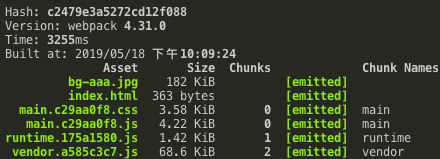
生成文件如图,app.b4ec117b.js 比之前的 index.js 文件小了许多
参考
- Vue+Webpack 打造 todo 应用-慕课网
- sass-loader | webpack 中文网
- url-loader | webpack 中文网
- 代码检验 · vue-loader
- User Guide | eslint-plugin-vue
- List of available rules - ESLint 中文
- eslint-plugin-vue/docs/rules at master · vuejs/eslint-plugin-vue
- javascript/packages/eslint-config-airbnb-base at master · airbnb/javascript
- no-param-reassign - Rules - ESLint - Pluggable JavaScript linter
- eslint-plugin-import/extensions.md at master · benmosher/eslint-plugin-import
- CSS 代码检查工具 stylelint - 小火柴的蓝色理想 - 博客园
- stylelint
- todo/webpack.config.js at master · marin1993/todo
- 一步一步的了解 webpack4 的 splitChunk 插件 - 掘金
- uglify not working · Issue #5858 · webpack/webpack
ChangeLog
- 2019-05-18 初稿